Most plumbing contractors set up QuickBooks Online the same way their accountant set it up for the last client — a generic chart of accounts, no classes, no projects, and a single revenue line called “Income.” That works fine if you never want to know which service lines make money and which ones eat margin. QuickBooks for plumbing contractors needs a purpose-built configuration that separates revenue by type, tracks labor by tier, and connects to the field service software your dispatchers use every day.
For the full picture, see our complete guide to plumbing bookkeeping. This post focuses specifically on the QuickBooks Online setup — the chart of accounts template, classes, projects, products and services, integrations, and the monthly close process that keeps your books clean.
Your chart of accounts determines what shows up on every financial report you pull. A single “Revenue” account tells you nothing. Six revenue accounts, tiered COGS, and segmented operating expenses tell you everything.
Here is the chart of accounts template we build for plumbing companies between $1M and $10M:
| Account # | Account Name | Type | Notes |
|---|---|---|---|
| 4000 | Service & Repair Revenue | Income | Residential and commercial service calls |
| 4010 | Drain Cleaning Revenue | Income | Jetting, snaking, camera inspections |
| 4020 | Remodel/Renovation Revenue | Income | Bathroom/kitchen remodels, repipes |
| 4030 | New Construction Revenue | Income | Rough-in and finish work on new builds |
| 4040 | Warranty Work Revenue | Income | Callbacks and warranty-covered repairs |
| 4050 | Maintenance Agreement Revenue | Income | Recurring service plans |
| Account # | Account Name | Type | Notes |
|---|---|---|---|
| 5000 | Field Labor — Apprentice | COGS | Loaded rate $27-$60/hr |
| 5010 | Field Labor — Journeyman | COGS | Loaded rate $55-$95/hr |
| 5020 | Field Labor — Master Plumber | COGS | Loaded rate $100-$175/hr |
| 5030 | Labor Burden (FICA, WC, Benefits) | COGS | If not baked into loaded rates above |
| 5040 | Materials & Parts | COGS | Pipe, fittings, fixtures purchased per job |
| 5050 | Truck Stock Consumed | COGS | Parts pulled from van inventory |
| 5060 | Subcontractor Costs | COGS | Trenchless, gas line, excavation subs |
| 5070 | Equipment Rental | COGS | Jetter, excavator, camera equipment |
| 5080 | Permits & Inspections | COGS | Municipal permits billed to jobs |
| Account # | Account Name | Type | Notes |
|---|---|---|---|
| 6000 | Fleet — Fuel | Expense | Track by vehicle if possible |
| 6010 | Fleet — Maintenance & Repairs | Expense | Oil changes, tires, repairs |
| 6020 | Fleet — Lease/Loan Payments | Expense | Monthly vehicle payments |
| 6030 | Insurance — General Liability | Expense | GL and umbrella policies |
| 6040 | Insurance — Vehicle / Commercial Auto | Expense | Fleet coverage |
| 6050 | Workers’ Compensation Insurance | Expense | Or include in COGS labor burden |
| 6060 | Licensing & Continuing Education | Expense | Master/journeyman renewals, CEU |
| 6070 | Warranty Reserve Expense | Expense | 1-2% of revenue set aside for callbacks |
| 6080 | Tools & Small Equipment | Expense | Under capitalization threshold |
| 6090 | Shop/Warehouse Rent & Utilities | Expense | Shop space, yard storage |
| 6100 | Office & Administrative | Expense | Office supplies, postage, misc |
| 6110 | Marketing & Advertising | Expense | Google Ads, LSA, print, wraps |
| 6120 | Software & Technology | Expense | Field service, accounting, CRM |
| 6130 | Training & Safety | Expense | OSHA, backflow cert, apprentice programs |
Pro tip: Don’t create sub-accounts for every vendor or part type. The chart of accounts gives you category-level visibility. Use Classes for service-line detail and Projects for job-level detail. A chart with 40-50 accounts beats one with 200 that nobody maintains.
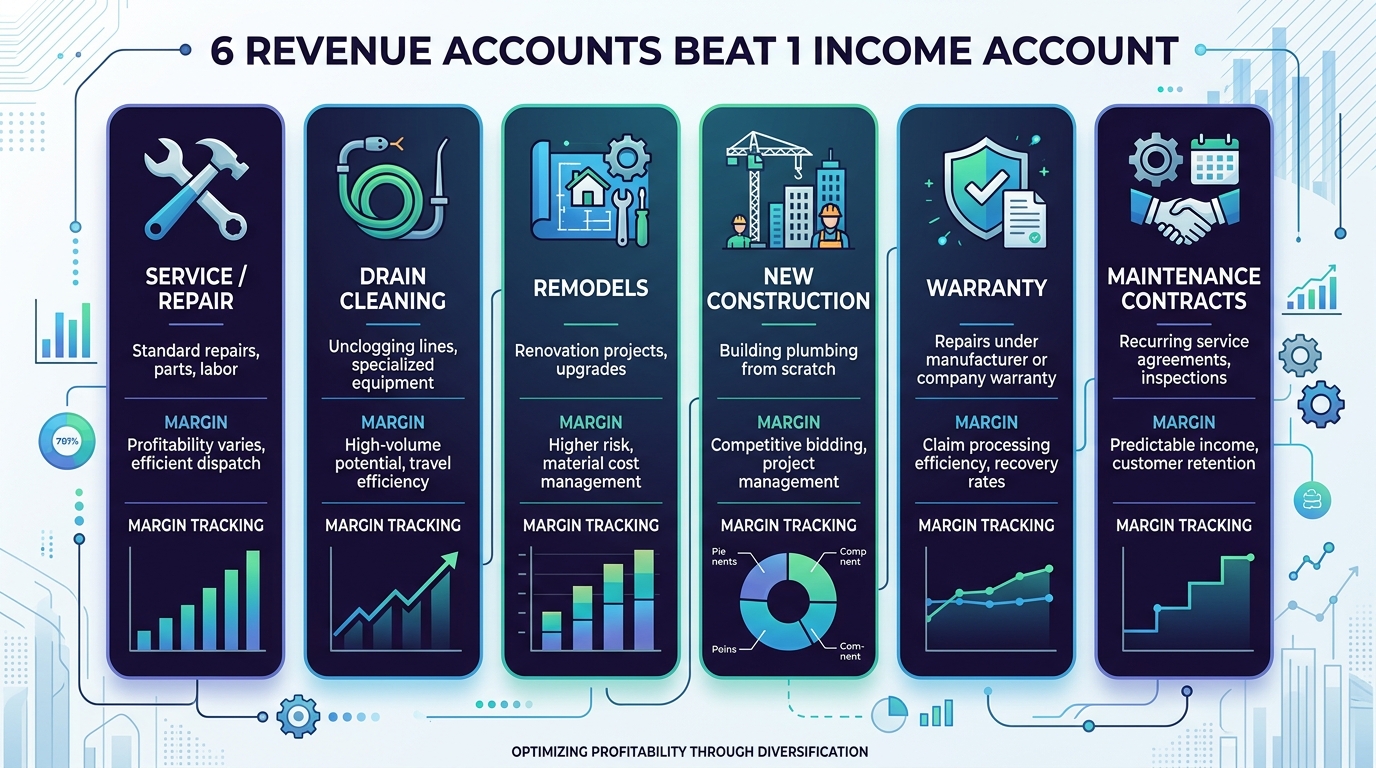
Classes in QuickBooks Online let you tag every transaction with a service type — then run a Profit & Loss by Class report to see exactly which service lines are profitable and which ones are dragging your margin down.
| Class Name | What It Captures |
|---|---|
| Service & Repair | Emergency calls, fixture replacement, leak repair |
| Drain Cleaning | Jetting, snaking, camera work, root treatment |
| Remodel | Bathroom/kitchen remodels, whole-house repipes |
| New Construction | Rough-in and finish on new builds |
| Maintenance Agreements | Recurring plan revenue and related labor |
| Overhead / Unallocated | Shop time, admin, non-billable hours |
Navigate to Reports > Profit and Loss by Class. Set the date range to the current quarter. You will immediately see something most plumbing company owners have never seen: the true gross margin of each service line, side by side.
A typical result looks like this:
| Metric | Service/Repair | Drain Cleaning | Remodel | New Construction |
|---|---|---|---|---|
| Revenue | $680,000 | $320,000 | $410,000 | $590,000 |
| COGS | $340,000 | $112,000 | $287,000 | $501,500 |
| Gross Margin | 50% | 65% | 30% | 15% |
That 15% on new construction might be acceptable at volume — or it might be destroying your blended margin. Without classes, you would never know. You would just see $2M in revenue and a blended 37% margin with no way to act on it.
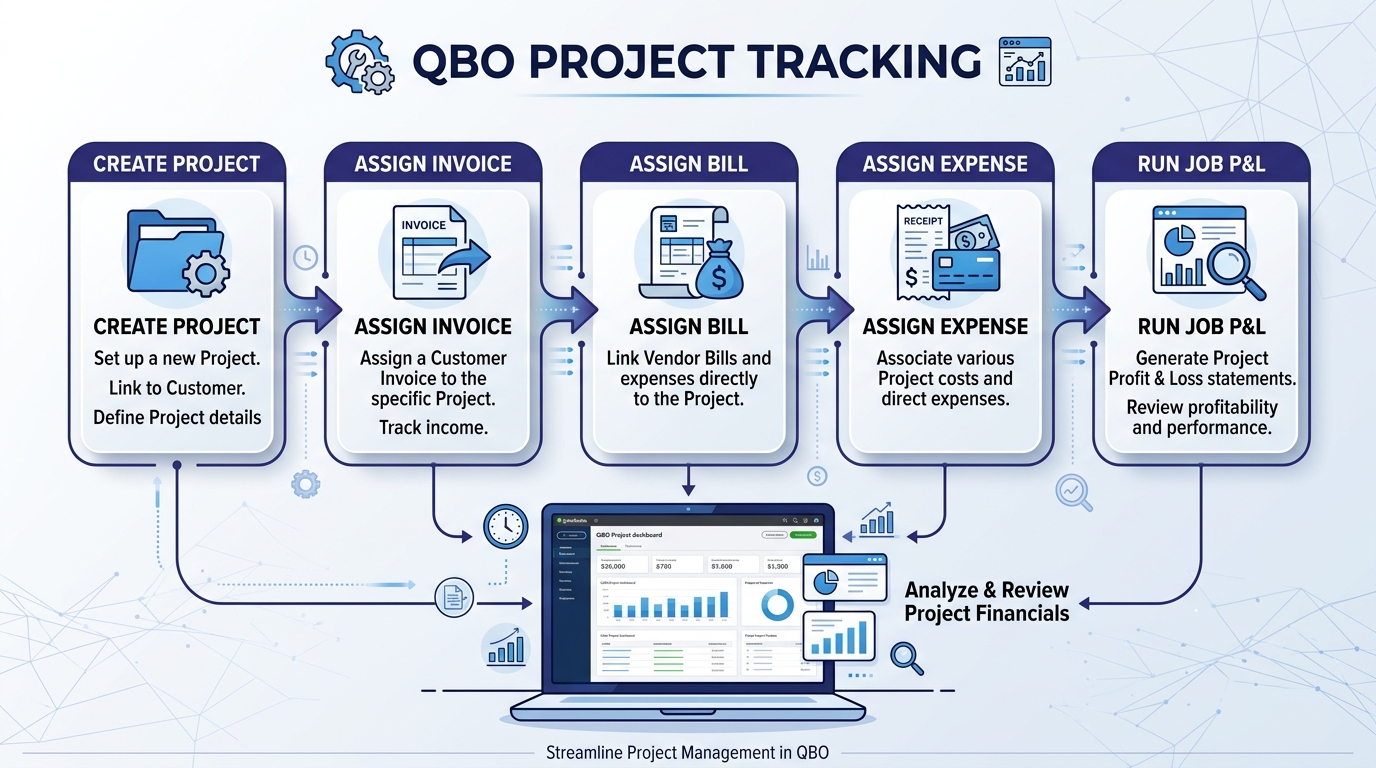
While Classes show you service-line profitability, Projects show you individual job profitability. For any job over $2,500, you should be creating a project in QuickBooks Online and assigning every related transaction to it.
[Customer] – [Address or Job Description] (e.g., “Martinez – 4521 Oak St Repipe”)Every invoice, bill, expense, and time entry related to that job gets assigned to the project. When you create or edit a transaction, select the project from the Project dropdown. This includes:
Go to the Projects page and click into any project. QBO shows you a dashboard with total income, total costs, and the resulting profit — all in one view. For a multi-week remodel, this is essential. You can see mid-project whether you are on budget or bleeding margin before you finish the work.
For the full report across all projects, run Reports > Project Profitability Summary. This gives you a ranked list of every job and its margin, so you can spot patterns: which neighborhoods, which job types, which techs consistently deliver higher-margin work.
Important: Projects require *QuickBooks Online Plus* or *Advanced*. If you are on QBO Simple Start or Essentials, you do not have access to Projects. For a plumbing company doing $1M+, the upgrade to Plus ($90/month) pays for itself within the first month of project-level visibility.
The Products & Services list in QuickBooks Online is what populates your invoices and purchase orders. For a plumbing company, you need a structured list that captures labor at different tiers and materials by category — not a flat list with 500 individual part numbers.
| Category | Type | Rate/Price | Notes |
|---|---|---|---|
| Labor — Apprentice | Service | $85-$120/hr billed | Maps to COGS 5000 |
| Labor — Journeyman | Service | $150-$200/hr billed | Maps to COGS 5010 |
| Labor — Master Plumber | Service | $200-$275/hr billed | Maps to COGS 5020 |
| Materials — Pipe & Fittings | Non-inventory | Varies | Maps to COGS 5040 |
| Materials — Fixtures | Non-inventory | Varies | Maps to COGS 5040 |
| Materials — Water Heaters | Non-inventory | Varies | Maps to COGS 5040 |
| Subcontractor — Trenchless | Service | Varies | Maps to COGS 5060 |
| Subcontractor — Excavation | Service | Varies | Maps to COGS 5060 |
| Subcontractor — Gas Line | Service | Varies | Maps to COGS 5060 |
| Equipment Rental | Service | Varies | Maps to COGS 5070 |
| Permit Fee | Service | Varies | Maps to COGS 5080 |
| Diagnostic / Trip Charge | Service | $49-$89 flat | Maps to Revenue 4000 |
Map each item to the correct income account (for billable items) or expense account (for cost items). This ensures that every line item on an invoice automatically posts to the right account in your chart of accounts — no manual journal entries needed.
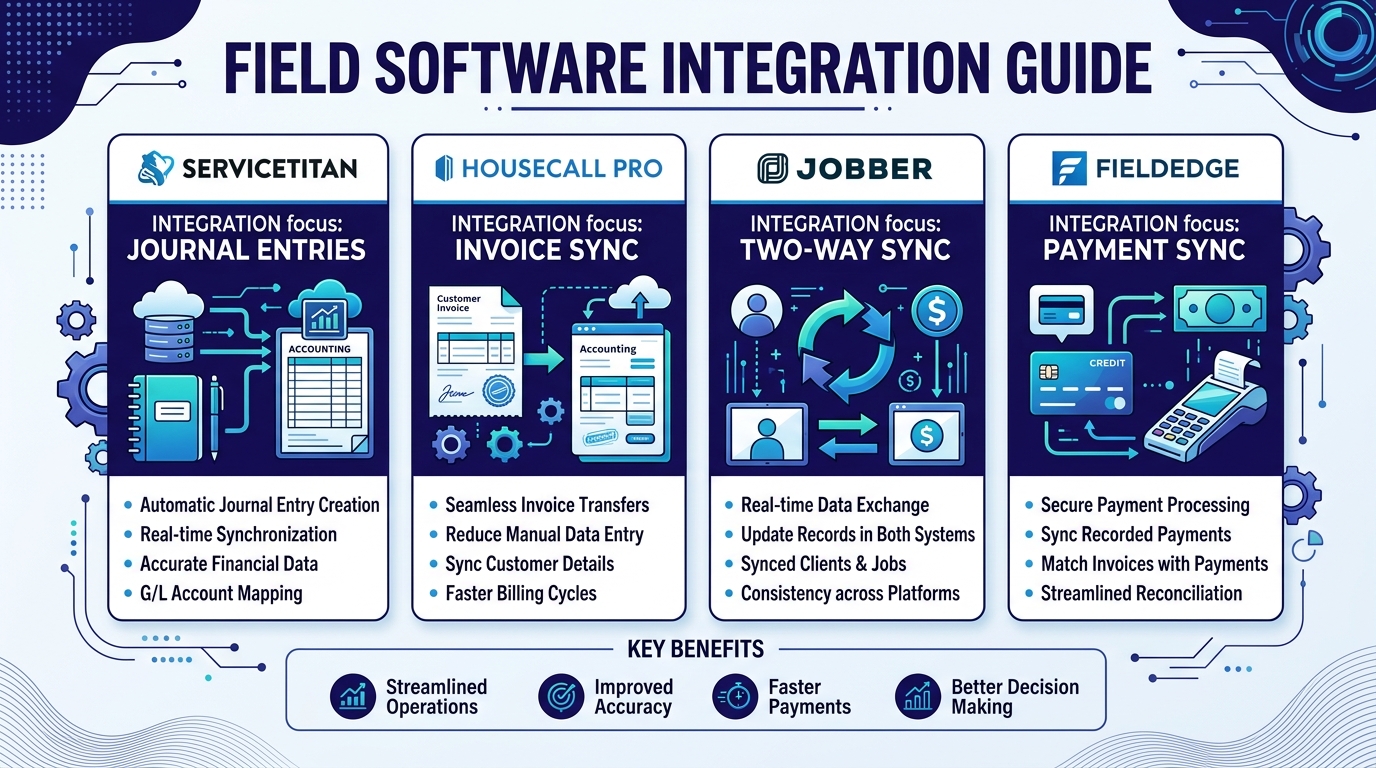
Your field service platform is where jobs, invoices, and payments originate. Getting the integration right with QuickBooks Online eliminates double-entry and keeps your books accurate in real time.
ServiceTitan is the market leader for residential and commercial plumbing companies. Its QBO integration works through journal entry exports, not direct invoice sync.
Housecall Pro offers a two-way sync with QBO that is more granular than ServiceTitan’s approach.
Jobber integrates with QBO through a direct connection with configurable sync options.
FieldEdge integrates with QBO primarily for payment synchronization.
After setting up QBO for dozens of plumbing contractors, these are the errors we see most often — and each one quietly distorts your financial picture.
1. Using one revenue account for everything. When service calls, drain cleaning, remodels, and new construction all land in a single “Plumbing Revenue” account, your P&L tells you nothing about which service lines are profitable. Split revenue into the six accounts listed above.
2. Not separating labor by tier in COGS. An apprentice at $35/hr loaded and a master plumber at $140/hr loaded have a 4x cost difference. A single “Labor” COGS line makes every job’s profitability a guess. Break COGS labor into at least three tiers: apprentice, journeyman, and master.
3. Skipping truck stock reconciliation. Every service van carries $3,000-$8,000 in parts. When techs pull fittings and don’t log them, those costs never hit the job. Monthly truck stock counts are the only way to capture this invisible COGS — run a physical count, compare to your last replenishment purchase, and book the difference to Account 5050.
4. Not enabling Projects. Without Projects, you have no per-job profitability data in QBO. You can see total revenue and total costs, but you cannot answer the question that matters: “Did we make money on that $45,000 repipe?” Enable Projects and assign every transaction over $2,500.
5. Mixing owner draws with operating expenses. When the owner’s truck payment, cell phone, or health insurance runs through operating expenses instead of an Owner’s Draw / Equity account, your P&L overstates operating costs and understates profit. An acquirer will catch this immediately during due diligence — and it makes your monthly financials unreliable for decision-making.
A clean monthly close takes your bookkeeper 4-6 hours. Skipping it means your financials drift further from reality every month until tax season arrives and your CPA charges a premium to untangle the mess.
Pro tip: Set a recurring calendar reminder for the 10th of every month. Your bank statements close on the last day of the month. By the 10th, all transactions have settled, credit card charges have posted, and you can close the prior month in under a day. Waiting until the end of the quarter turns a 5-hour task into a 20-hour scramble.
Need help setting up QuickBooks for your plumbing company? Steph’s Books specializes in bookkeeping for plumbing contractors — from chart of accounts buildout to field service integration. We handle the monthly bookkeeping so you can focus on running your business. Get a free consultation →
Get a free quote and see how Steph's Books can save you 40-60% vs hiring in-house.
